Mobile Printing
Possibility to directly print documents from a mobile device
Independent workplace technology specialists

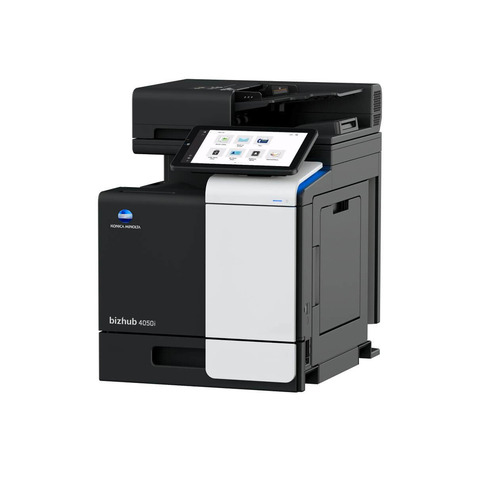
Previous office device
A previous-generation Konica Minolta bizhub 5020i multifunction retained for reference. 50 ppm in black & white.
Specified and supported by HAD-COPY
Use this product information as a starting point; HAD-COPY will confirm the right configuration, software, installation and support for your organisation.
Device features
Useful capability, explained in practical terms and configured around the work your organisation actually produces.
Possibility to directly print documents from a mobile device
Print driver customisation
for best output quality
Prevents noise disturbance due to reduced noise while printing
Prints copies of the front and back of the original on the same page, e.g. for passport and other ID
Duplex, 2in1 and 4in1 copying can be selected
Improves the document quality by editing the density, brightness, etc.
Including TIFF, PDF, Compact PDF, JPEG, etc.
Sends converted files to an FTP server
Direct scan to own email address (Me) or SMB folder (Home) based on Active Directory information
for clever digitisation of documents
Fax destinations can be preconfigured in an addressbook
Device specification
Open each group to compare the specifications that matter to your users, documents and expected workload.
| Panel size/resolution | 4.85” |
|---|---|
| System memory (standard/max) | 1,000 MB (standard/max) |
| Interface 10/100/1,000-Base-T Ethernet; USB 2.0; Wi-Fi 802.11 b/g/n Network protocols | TCP/IP (IPv4 / IPv6); LPD; IPP; SNMP; HTTP; HTTP(S) |
| Automatic Document Feeder | Up to 80 originals; A6-A4; 64-90 g/m²; Dualscan ADF |
| Paper input capacity (standard/max) | 570 sheets / 1,610 sheets (standard/max) |
| Paper tray input (standard) | 1x 520 sheets; A6-A4; 60-120 g/m² |
| Paper tray input (optional) | 1x 250 sheets; A5-A4; 60-120 g/m² (up to 2x) 1x 520 sheets; A5-A4; 60-120 g/m² (up to 2x) |
| Manual bypass | 50 sheets; A6-A4; custom sizes; 60-200 g/m² |
| Automatic duplexing | A4; 60-105 g/m² |
| Output capacity (standard) | 250 |
| Copy/print volume (monthly) | Rec. 10,000 pages; Max. 150,000 pages |
| Toner lifetime | Black up to 20,000 pages |
| Imaging unit lifetime | 50,000 |
| Power consumption 220-240 V / 50/60 Hz; Less than 805 W System dimension (WxDxH) 495 x 427 x 518 mm (without options) System weight | Approx. 18.9 kg (without options) |
| Print resolution | 1,200 x 1,200 dpi |
|---|---|
| Page description language | PCL 6 (XL3.0); PostScript 3; XPS |
| Operating systems | Windows 7 (32/64); Windows 8.1 (32/64); Windows 10 (32/64); Windows Server 2008 (32/64); Windows Server 2008 R2; Windows Server 2012; Windows Server 2012 R2; Windows Server 2016; Windows Server 2019; Macintosh OS X 10.10 or later; Linux |
| Printer fonts | 85 PCL Latin; 66 PostScript 3 Emulation Latin |
| Mobile printing | Mopria (Android); Konica Minolta Print Service (Android); Konica Minolta Mobile Print (iOS/Android/Windows 10 Mobile); Google Cloud Print; WiFi Direct |
| Scan speed (mono/colour) | Up to 50/20 ipm in simplex Up to 100/34 ipm in duplex |
|---|---|
| Scan resolution | 1,200 x 1,200 dpi |
| Scan modes | Scan-to-eMail (Scan-to-Me); Scan-to-FTP; Scan-to-USB; TWAIN scan; WIA scan |
| File formats | JPEG; TIFF; PDF; XPS Optional: Searchable PDF |
| Scan destinations | LDAP support |
| Imaging technology | Laser |
|---|---|
| Toner technology | Polymerized Toner |
| Copy/print speed A4 (mono) | Up to 50 ppm |
| Autoduplex speed A4 (mono) | Up to 24 ppm |
| 1st copy out time A4 (mono) | 9.5 sec. |
| Warm-up time | Approx. 27 sec. |
| Copy resolution | 600 x 600 dpi |
| Gradation | 256 gradations |
| Multicopy | 1-999 |
| Original format | A6-A4 |
| Magnification | 25-400% in 1% steps; auto-zooming |
| Fax standard | Super G3 |
|---|---|
| Fax transmission | Analogue; i-Fax |
| Fax compression | MH; MR; MMR; JBIG |
| Fax modem | Up to 33.6 Kbps |
| Fax destinations | 299 destinations + 20 groups |
| Security | SSL2; SSL3 and TLS1.0/1.1/1.2 network communication; IPsec support; IEEE 802.1x support; Secure print; Kerberos |
|---|---|
| Accounting | AActive Directory support (user name + password + e-mail + smb folder) Optional: ID card authentication (ID card reader) |
| Software | Net Care Device Manager; Web Connection; Driver Packaging Utility |
These archived specifications describe the model when supplied; configurations and installed options may vary.
Support without leaving this page
Choose your operating system and download the appropriate Konica Minolta files below. If you are unsure which package you need, HAD-COPY can help.
Need help with installation? Ask HAD-COPY about this device.
Existing device or replacement?
No photocopier surprises
Equipment condition, costs, agreement dates, service ownership and what happens next—explained in plain English.
Read our clarity commitmentsOne group. More expertise.
From managed print and document workflows to business IT, bespoke print and technology repair, HAD-GROUP connects the right expertise around your organisation.


